
My seasonal content internal linking strategy connects seasonal pages to evergreen content across a site so the seasonal pages retain authority, traffic, engagement, and value beyond their peak period. Instead of letting the seasonal pages become orphaned after their season fades, I use internal links to keep them discoverable and valuable year-round.
Many B2B marketers accept that seasonal content has a shelf life. You publish a Black Friday roundup, a Summer Deals page, or a Q4 Budget Planning guide, the page peaks, and then traffic drops off a cliff. This cycle feels inevitable, and marketers have long grown accustomed to it.
But the value of seasonal content pages doesn’t drop off because of their seasonal nature. Seasonal pages’ value drops off because most sites treat the pages as standalone pieces, completely disconnected from the rest of their content ecosystem. That used to be me until I discovered how to use the actionable seasonal content internal linking strategy I’ll discuss in this article to keep seasonal pages continually relevant, indexed, visible, and valuable year-round.
Key Takeaways
- Seasonal content loses most of its traffic after peak season, but internal linking preserves authority and visibility during off-peak months.
- Connecting seasonal pages to evergreen content through contextual internal links distributes link equity and keeps those pages discoverable by both users and search engines.
- Internal linking for seasonal pages should be planned at the content strategy stage, not added as an afterthought during publishing.
- Bidirectional linking between seasonal and evergreen pages creates a reinforcing loop where both page types benefit from shared authority.
- Navigation-based internal links (menus, footers, resource hubs) give seasonal pages persistent visibility across your entire site.
- Sites that fix orphaned content through systematic internal linking see measurable traffic recovery. A Linkify case study documented a 43% increase in organic traffic after connecting previously isolated pages.
Are you struggling to get value from your seasonal pages year-round? Reach out now to learn how I can help you.
The Challenges of Seasonal Content
Seasonal content behaves like a pop-up shop. It attracts a surge of visitors during peak season, then goes quiet once the moment passes. The difference is that a physical pop-up shop closes intentionally. Seasonal pages don’t close; they just get forgotten.
If you look at Google Trends data for terms like Christmas gift ideas or Valentine’s Day gift, you’ll see the pattern clearly. Interest spikes sharply during a narrow window, then drops for the rest of the year. Seasonal pages can lose 40-90% of their traffic within weeks of peak season ending, and Google Trends data consistently shows near-zero search interest for seasonal terms outside their peak window.
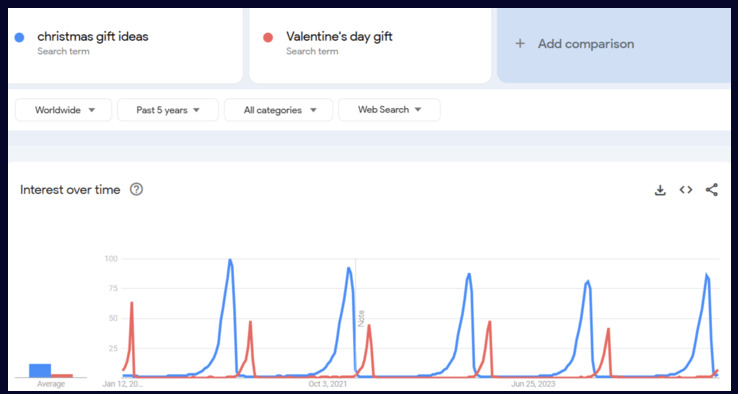
Source: Google Trends
That traffic loss isn’t just about demand disappearing. It’s compounded by a structural problem: most seasonal pages become orphaned, with few or no internal links pointing to them from other pages on the site. Search engines struggle to find and crawl these orphaned pages, and users can’t navigate to them naturally. And when peak season returns, these orphaned seasonal pages have to rebuild authority from scratch instead of starting from a strong foundation.
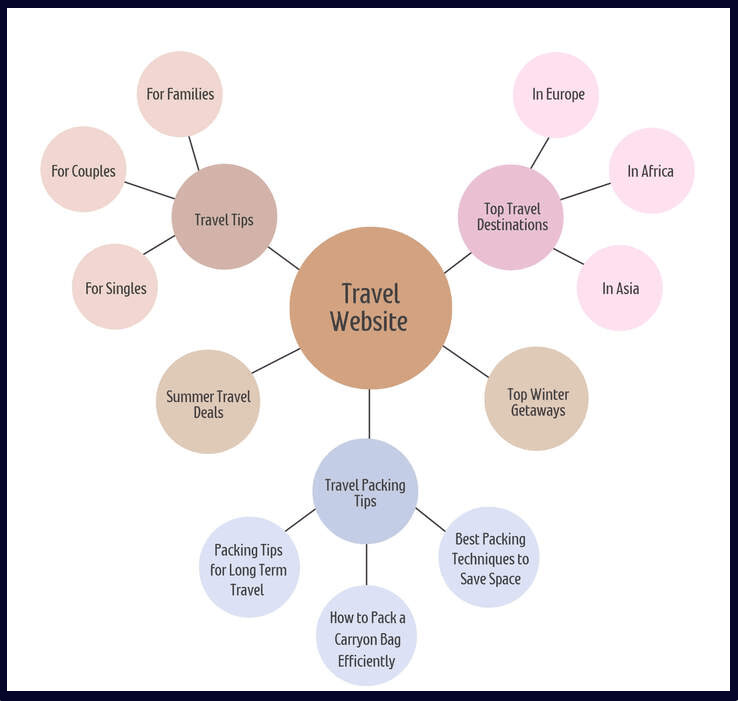
The pages, Summer Travel Deals and Top Winter Getaways, are orphaned and have limited interaction with the rest of the site.
The orphaned page problem is where most seasonal content strategies fall apart. You can create the best Summer Sales Planning Guide on the internet, but if it sits disconnected from your content ecosystem for nine months, it loses crawl priority, accumulates no new link equity, and essentially starts over every year.
That’s a waste of the effort you put into creating it in the first place.
If your seasonal content pages keep losing traction every off-season and you want a strategic approach to fix that, reach out via LinkedIn.
Why Internal Linking is the Solution
Internal linking improves SEO by distributing link equity across your site, helping search engines understand page relationships, and improving crawl efficiency. For seasonal pages, internal links from evergreen content preserve authority during off-peak months, keeping pages indexed and primed to recapture rankings when demand returns.
Internal links are the connective tissue of your website. They tell search engines how your pages relate to each other, they guide users through your content, and they distribute the authority your site has earned across the pages that need it most. For seasonal content, internal linking solves three specific problems that cause off-season traffic collapse.
Distributes link equity to seasonal pages
Link equity is the authority that flows between pages through links. When your high-performing evergreen content links to a seasonal page, it shares some of that authority. This keeps the seasonal page’s domain authority signal alive even when no one is actively searching for seasonal terms.
Think of it as keeping the lights on in that pop-up shop. The shop isn’t open for business during the off-season, but the lights being on signal to anyone walking by (and to Google’s crawlers) that the shop still exists and will reopen. Without those internal links, the shop goes dark, and both search engines and users forget it’s there.
For B2B marketers, this is especially important because your seasonal content often targets high-intent keywords tied to budget cycles, quarterly planning, or industry events. You don’t want to rebuild authority on those pages every single cycle.
Improves user navigation to seasonal content
Internal links also create pathways for users to discover seasonal content outside its peak window. A reader browsing my B2B Content Marketing Strategy Guide in March might not be thinking about Q4 planning yet, but a contextual link to a Q4 Content Planning Guide plants a seed. When they do start planning, they remember where they saw it.
This matters for B2B buying cycles, which are long and involve multiple touchpoints. Your seasonal content doesn’t need peak-season traffic to be useful; it needs to be findable when a buyer’s journey intersects with its topic.
Reinforces SEO signals for seasonal pages
Internal links send crawl and relevance signals to search engines. When multiple pages on your site link to a seasonal page using descriptive anchor text, you’re reinforcing what that page is about. Search engines use those signals to understand context and topical relevance, which directly influences rankings.
This is why random or generic internal links don’t work well. Linking to your Holiday Campaign Playbook with anchor text that says click here does almost nothing for SEO and UX. But linking with anchor text like holiday campaign planning framework for B2B teams tells Google and the reader exactly what the target page covers.
If you’re working on a b2b content marketing strategy and want to make internal linking a bigger part of how you keep seasonal content performing, I can help you. Reach out via LinkedIn.
Internal Linking is a Strategy Decision, Not a Technical One
Internal linking should be decided at the content planning stage, not added after publishing. Most content teams treat internal links as a final checklist item: write the article, publish it, then go back and sprinkle in a few links. That approach almost guarantees weak, random connections between pages.
The data support this. A LinkStorm study of 2.5 million internal links across 1,700 websites found that 28% of internal link anchor texts have zero similarity to their target page title, and only 8% are strongly aligned with what the target page actually covers.
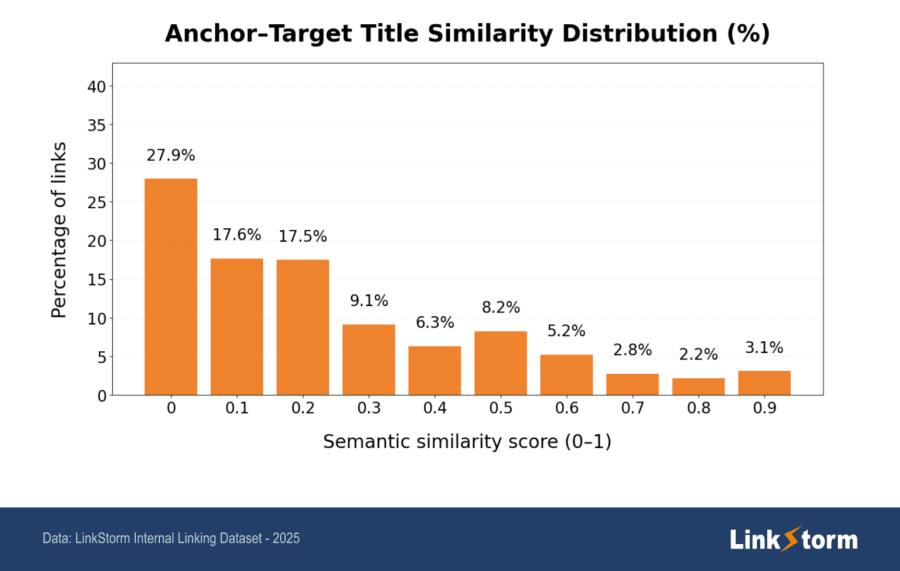
That kind of mismatch happens when linking is reactive instead of planned. Teams add links wherever they happen to fit, rather than mapping them to a deliberate content architecture.
The real question you should ask yourself isn’t ‘where can I add a link?‘ but ‘which pages should receive authority, and which should push readers toward conversion?‘ That’s a strategic question, not a technical one. When you plan internal links at the brief stage, you’re making deliberate decisions about how authority flows across your site and how readers move through your content toward a buying decision.
For B2B marketers specifically, planning internal links upfront means tying seasonal pages to the rhythms of your prospect’s calendars. Map your Q1 planning guides to your product launch content. Connect your end-of-year budget allocation posts to your ROI case studies. When you build these connections at the brief stage, every seasonal page launches with a support system already in place, rather than sitting alone until someone remembers to link to it months later.
This is the difference between a seasonal content operation that compounds and one that constantly restarts. Internal linking planned at the strategy layer means seasonal pages maintain visibility because the architecture was designed that way, not because someone went back and patched it.
If you want help mapping internal linking into your content planning process from the start, reach out via LinkedIn, and I can walk you through how I structure this for B2B content operations.
How to Plan an Internal Linking Strategy for Seasonal Content
A five-step process — from identifying orphaned seasonal pages to building bidirectional links — turns seasonal content from a one-time asset into a compounding authority source. I use this process for every B2B content operation I work on, and it applies whether you have ten seasonal pages or a hundred.
Identify key seasonal pages
Before you build an internal linking structure, investigate the seasonal pages’ performance in terms of traffic, engagement, and revenue, and identify which pages to prioritize.
I use Google Search Console (GSC) and Semrush’s Top Pages report to get this data, but you can use any SEO tool that shows page-level organic performance over time.
I follow these steps:
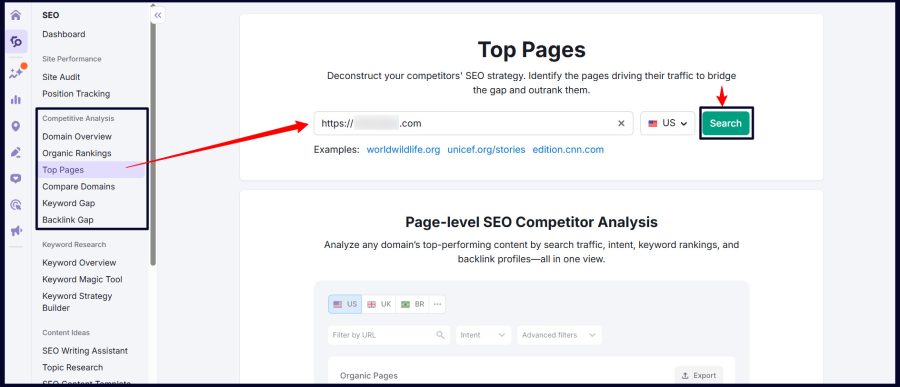
1. Open Semrush, navigate to Competitive Analysis > Top Pages, enter your website address, and click Search.
Source: Semrush
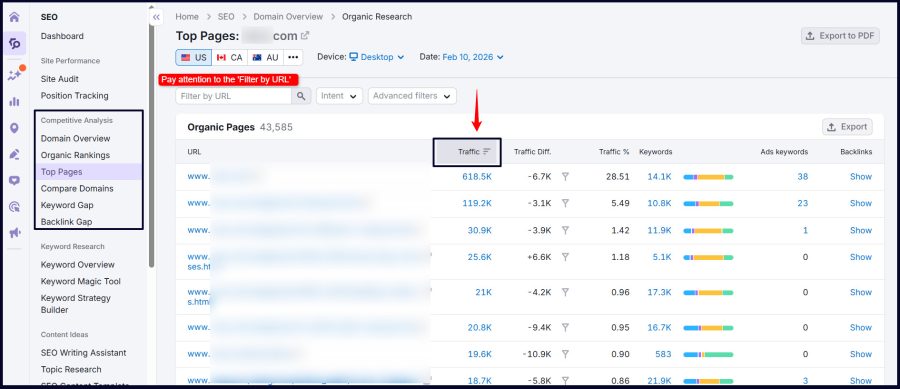
2. Sort by traffic and identify seasonal pages. Holiday guides, annual event pages, quarterly planning content, and campaign-specific landing pages are typical seasonal pages.
Source: Semrush
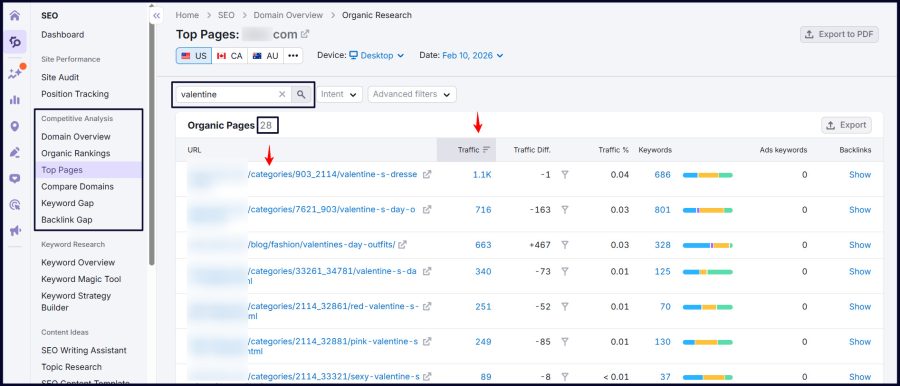
3. Use seasonal keywords to view pages by season. For instance, for Valentine-related seasonal pages, input Valentine into the ‘Filter by URL’ and click the tiny ‘Search’ icon.
Source: Semrush
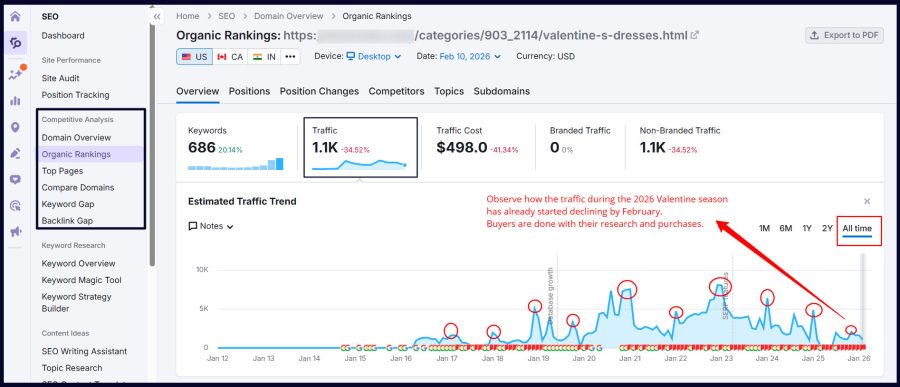
4. Check historical traffic trends for each page. In Semrush, click into individual pages and review the traffic chart over a period. You’re looking for clear seasonal peaks and valleys.
Source: Semrush
5. Note the current internal link count. Semrush’s Site Audit or Backlink Analytics can show you how many internal links currently point to each page. Pages with very few internal links are your highest-priority targets.
6. Flag orphaned pages. Any seasonal page with fewer than two or three internal links pointing to it is functionally orphaned. These are the pages that will benefit most from a deliberate internal linking strategy.
Need assistance with identifying your top-performing seasonal pages? Let’s discuss how I can help you tighten your strategy.
Organize seasonal pages for strategic optimization
Once you’ve identified your seasonal pages, organize them into categories so you can plan your linking strategy by content type rather than page by page. The categories I typically use are:
- Holiday and seasonal guides: Content tied to specific holidays, seasons, or annual events (e.g., Thanksgiving Recipes, Christmas Gift Guides, Halloween Costume Ideas, Q4 Budget Planning Guide, and Black Friday B2B SaaS Deals Roundup).
- Sales and promotion pages: Landing pages for time-limited offers, seasonal discounts, or campaign-specific promotions (e.g, Back-to-School Deals, Spring Clearance Sales, and Summer Swimwear Sales).
- Event content: Pages tied to annual conferences, industry events, webinars, or product launches with a seasonal cadence (e.g., Super Bowl Party Essentials, GTCO Fashion Weekend Itinerary, and New Year’s Eve Party Planning Tips).
- Special offers and seasonal resources: Downloadable templates, tools, or resources that are most relevant during specific periods (e.g., Year-End Marketing Audit Checklist, Cyber Monday Flash Deals, Valentine’s Day Special Discounts, and Exclusive Summer Gym Membership Deals).
Categorizing helps you see patterns. You might find that all your holiday guides are orphaned while your event content is well-connected. That tells you where to focus first.
Use evergreen content for seasonal content internal linking
Evergreen content is your most powerful asset for supporting seasonal pages through internal links. These are the pages that maintain consistent traffic year-round: your pillar pages, how-to guides, and foundational educational content. Linking from these evergreen pages to your seasonal content creates a permanent bridge that passes authority regardless of the season.
I like the approach Justin Dunham, CEO of Ercule, adopts when using evergreen content to support seasonal pages:
“If your core value proposition is that you create gear that keeps customers comfortable in all environments or is rugged enough to stand up to anything, then you can link your Winter seasonal posts in more general posts about those themes, too. Whereas, if you spent a lot of time talking about how your camping gear makes a great Christmas present, you can’t really use that anywhere else.”
Dunham highlights how an outdoor gear retailer could keep a Winter Hiking Essentials guide relevant beyond the colder months by embedding it within broader, evergreen content, such as Year-Round Hiking Tips or Top Camping Gear.
This approach works because the connection is topically relevant. You’re not forcing a link between unrelated pages; you’re connecting content that genuinely belongs together. When a reader is on your Evergreen B2B Content Marketing Strategy page, a link to your Q4 Content Planning Framework page makes perfect sense. The reader’s intent naturally extends from one topic to another.
Here are practical examples of how this works:
- Direct users from a product category page, like Outdoor Furniture, to a seasonal page, such as Top Patio Furniture Deals for Summer.
- Link a broad resource like Holiday Recipes to a seasonal guide, such as Christmas Dinner Menu Ideas.
- Drive engagement from an offers page like Our Deals and Offers to time-sensitive promotions for different seasons.
- Connect an events hub like Our Events to specific seasonal event pages.
- Link from your Content Marketing ROI Guide (evergreen) to your Year-End Content Performance Audit (seasonal)
- Write problem-first blog posts that address challenges your audience faces at specific times of year, and link those to your seasonal resources.
- Link from your SEO Best Practices evergreen page to your Holiday SEO Checklist seasonal page.
Use site navigation for internal linking

Source: LinkedIn
Site navigation provides persistent internal links that stay visible across every page on your site. For seasonal content, navigation-based links are particularly valuable because they don’t depend on someone reading a specific blog post to discover the link.
Tyler Nalbach, SEO Consultant at SEO Align, explains their approach:
“For brands focused on internal linking, our goal is to drive more traffic to subcategory pages. If a brand has a Dresses category, we create targeted subcategories like Fall Dresses or Summer Dresses. We then direct internal links from the main category, relevant pages, and supporting blog content – such as The 7 Best Dresses for Fall 2025 – to reinforce the seasonal subcategory’s authority.”
There are several navigation internal linking strategies you can use:
Footer and resource hub links: Add seasonal content to footer navigation or dedicated resource hub pages that aggregate related content. A Seasonal Marketing Resources hub page, for example, can link to all your seasonal content from one persistent location.
Main menu links: If your seasonal content is significant enough (e.g., a major annual campaign), give it a temporary spot in your main navigation during peak season, then move it to a submenu during off-peak months rather than removing it entirely.
Category and subcategory pages: Organize seasonal content within relevant categories so it’s always accessible through your site’s content hierarchy.
Use seasonal content for link equity
The relationship between seasonal and evergreen content should flow both ways. Your seasonal pages, especially during peak season when they attract the most traffic and external backlinks, should also link back to your evergreen content. This creates a bidirectional flow of link equity that strengthens both page types.
During peak season, seasonal pages often attract backlinks from other sites, social media shares, and direct traffic spikes. By linking from those seasonal pages to your core evergreen content, you’re channeling some of that incoming authority back into your permanent content assets.
The impact of fixing these connections is measurable. A Linkify case study documented a 43% increase in organic traffic when orphaned content was connected to the rest of the site through systematic internal linking. Also, traffic to the previously orphaned content increased by 298%, the bounce rate dropped from 78% to 62%, and pages per session rose from 1.3 to 2.4, indicating that users who arrived were actually finding related content to explore rather than hitting dead ends.
This bidirectional approach means your seasonal pages aren’t just taking authority from evergreen content; they’re also contributing authority back. It turns your seasonal content from a one-way investment into a compounding asset that improves your entire site’s SEO performance over time.
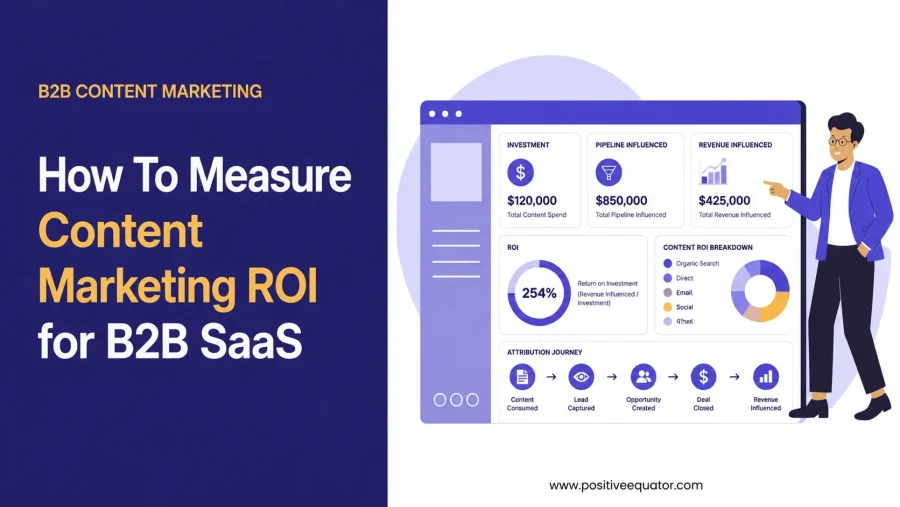
Read: How To Measure Content Marketing ROI for B2B SaaS (When Leadership Wants Proof)
If you’re building b2b content strategy and want seasonal pages that actually contribute to your pipeline year-round, reach out via LinkedIn.
Best Practices to Keep in Mind when Adopting Internal Linking for Seasonal Pages
These nine practices separate internal linking strategies that compound over time from ones that stall after a single implementation pass.
Use heat maps to improve link placements
Heat maps from analytics tools show where users engage most on a page. Use these high-attention areas — such as clicked buttons, comparison sections, or key content blocks — to place internal links to seasonal pages. This improves discoverability, strengthens contextual internal linking signals, and supports both SEO and AEO visibility.
For instance, if a product overview section receives heavy interaction, I’d embed an internal link to a related seasonal guide, such as Top Holiday Gifts for Campers.
Use descriptive and keyword-rich anchor text
Anchor text is the clickable text in a hyperlink, and it directly influences how search engines understand the relationship between linked pages. For seasonal content, always use anchor text that includes the target page’s primary keyword or a close variation of it. Avoid generic phrases like ‘read more‘ or ‘click here‘ because they provide no contextual signal to search engines about what the linked page covers.
Prioritize contextual relevance over link volume
More internal links aren’t automatically better. A single contextual link from a highly relevant evergreen page carries more weight than ten links from unrelated pages. Focus on creating links where the connection between pages makes sense for the reader, not just for crawlers. If a link doesn’t serve the reader’s intent, it’s adding noise, not value.
Audit internal links regularly
Internal linking isn’t a set-and-forget task. Pages get updated, URLs change, and content priorities shift. Run a quarterly internal link audit to check for broken links, identify newly orphaned pages, and find opportunities to connect recent content to your seasonal pages. Semrush, AirOps workflows, Ahrefs, Sitebulb, or Screaming Frog can help you automate much of this.
Balance link distribution across the site
Don’t funnel all your internal links to a handful of seasonal pages while ignoring the rest of your site. A natural internal linking profile distributes authority broadly, with strategic emphasis on your highest-priority pages. If every page on your site links to one seasonal campaign, that looks unnatural to search engines and dilutes the signal you’re trying to send.
Diversify link placements
Diversify internal link placement by adding seasonal page links within body content, navigation menus, footers, sidebars, and other high-visibility sections. This improves discoverability for users, strengthens site architecture, distributes internal authority more effectively, and increases the chances of search engines and AI systems consistently finding and understanding those pages.
Update internal links as part of content refreshes
Every time you refresh or update a piece of content, review its internal links. Are there newer seasonal pages that should be linked? Are there outdated links pointing to retired content? Content refreshes are the ideal moment to strengthen your internal linking architecture because you’re already reviewing the page.
Optimize for upcoming seasons
Optimize for upcoming seasons by updating internal links weeks ahead of peak periods, giving search engines enough time to crawl and reindex changes. For new seasonal pages, ensure they’re discovered, indexed, and building authority early. Early preparation improves visibility, strengthens rankings before demand spikes, and supports stronger SEO and AEO performance.
If you want to put these best practices to work across your seasonal content portfolio, reach out via LinkedIn, and I’ll walk you through how to prioritize what to fix first.
Examples of Effective Seasonal Internal Linking
Seeing this internal linking approach in practice makes the strategy clearer. Here are several examples of how real websites connect seasonal content to the rest of their site.
Lulus: subcategory navigation for seasonal collections
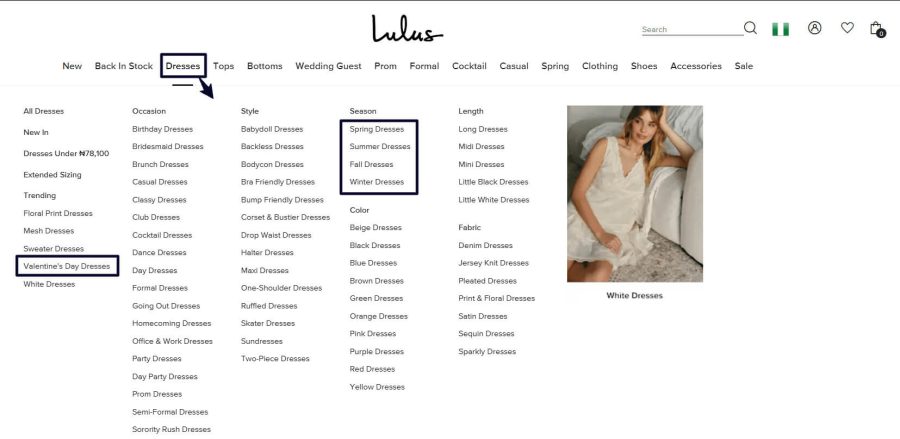
Lulus uses their main navigation menu to create direct pathways to seasonal content. Their category structure includes subcategories like Spring Dresses and Valentine’s Day Dresses that sit within the broader Dresses category. This gives seasonal pages persistent visibility through the site’s navigation while maintaining a logical content hierarchy.
Source: Lulus
Users browsing dresses in any month can still discover and click through to seasonal collections, keeping those pages active in both user sessions and search engine crawls.
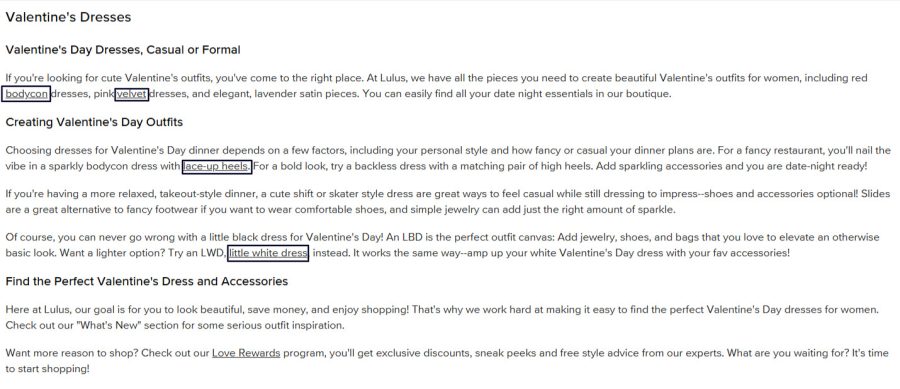
When you visit the Valentine’s Day Dresses page, you’ll notice how strategically they integrated internal links to relevant evergreen pages. The links feel natural within the content flow, and the anchor texts are contextually relevant rather than forced, helping both users and search engines better understand the relationship between the pages.
Source: Lulus
Aldo: Homepage Promotion of Seasonal Sales
Aldo takes a more prominent approach by featuring seasonal content directly on their homepage. During their winter sales period, a red menu tab links directly to the Winter Sales landing page. This puts the seasonal page one click from the site’s highest-authority page (the homepage), maximizing the link equity it receives.

Source: Aldo Shoes
Paella Fella: Menu and Contextual Content Links
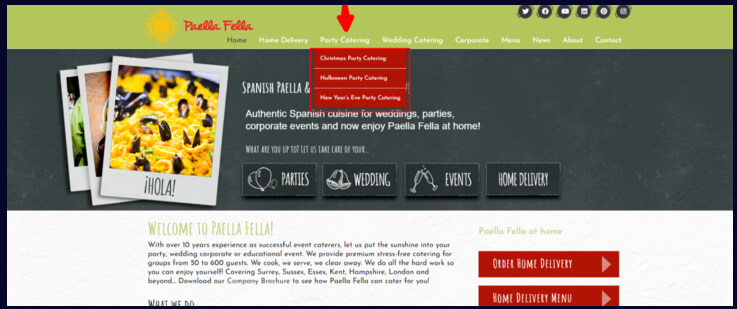
Paella Fella demonstrates how smaller service sites can use both navigation and contextual internal links effectively. Their main menu includes direct links to their Christmas Party Catering, Halloween Party Catering, and New Year’s Eve Party Catering pages, giving them persistent site-wide visibility.
Source: Paella Fella
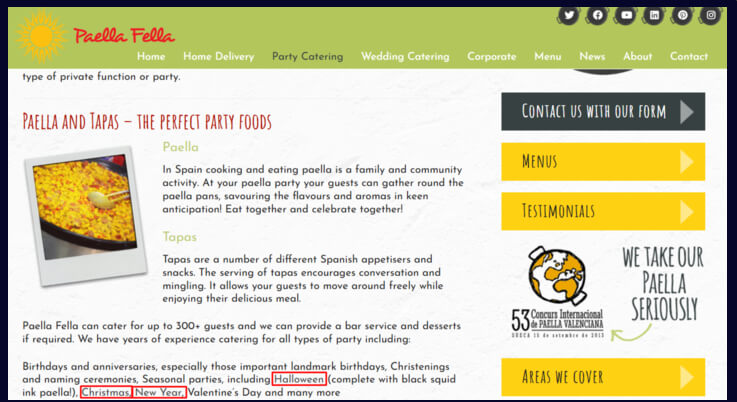
They also embed contextual links within relevant blog posts and service pages, creating multiple pathways for users and crawlers to reach seasonal content.
Source: Paella Fella
Julia Charles Event Management: Multi-Layered Internal Linking
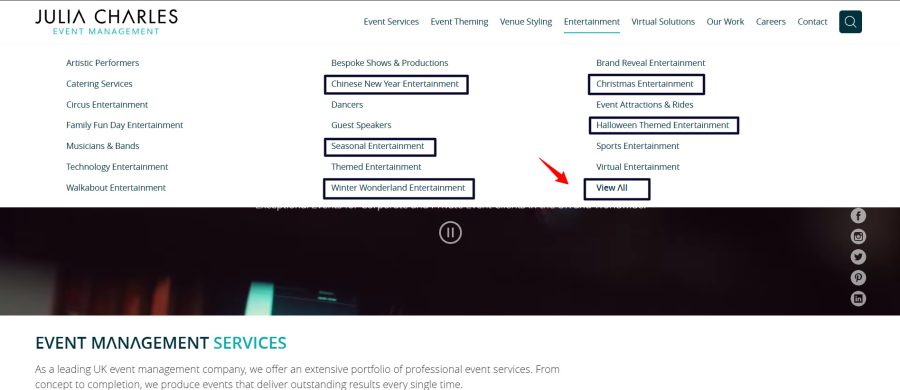
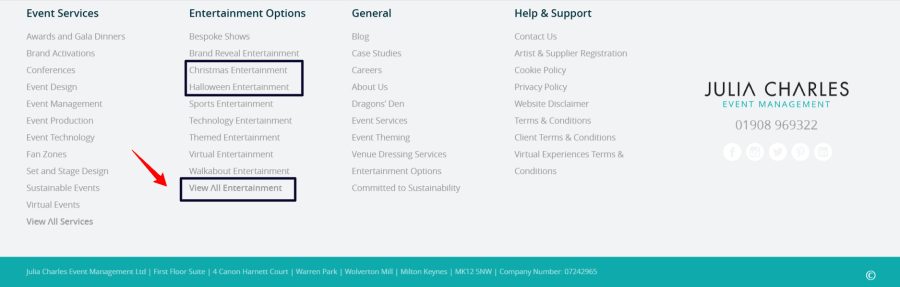
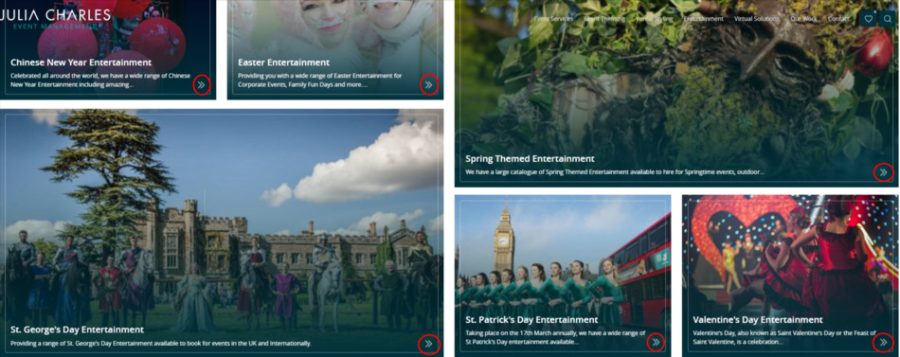
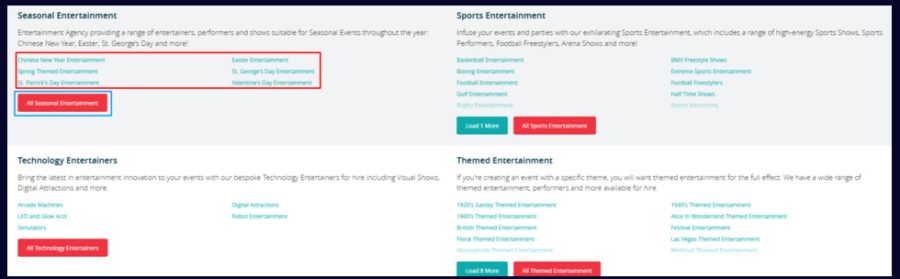
Julia Charles Event Management uses the most comprehensive approach. They connect seasonal content through the main menu, footer links, a dedicated seasonal entertainment hub page, and embedded contextual links within related content. This multi-layered strategy ensures that their seasonal event pages are accessible from virtually every corner of the site.
Source: Julia Charles Event Management
Source: Julia Charles Event Management
Source: Julia Charles Event Management

Source: Julia Charles Event Management
Source: Julia Charles Event Management
The impact of fixing internal linking at scale is substantial. An seoClarity case study documented a large retail brand that gained over 150,000 additional annual visits after systematically fixing internal links across its pages. The improvements came not from creating new content, but from properly connecting existing content that had been underperforming due to poor internal link architecture.
Each of these examples follows the same core principle: seasonal pages should never exist in isolation. Whether through navigation, contextual links, or dedicated hub pages, the goal is to keep seasonal content connected to the rest of your site year-round.
Want to see what this looks like applied to your site’s seasonal pages? Reach out via LinkedIn, and I’ll audit your current internal linking structure.
Measuring the Impact of this Strategy
Implementing an internal linking strategy for seasonal content is only valuable if you track its results. Here are the metrics I focus on to measure whether the strategy is working.
Organic traffic during off-peak months. The primary indicator of success is whether your seasonal pages maintain more traffic during off-peak months compared to previous years. Use GSC or Google Analytics (GA) to compare year-over-year traffic for specific seasonal pages.
Crawl frequency. GSC’s crawl stats report shows how often Googlebot visits your pages. After adding internal links to a previously orphaned seasonal page, you should see an increase in crawl frequency, which means search engines are discovering and re-evaluating the page more regularly.
Internal link count per page. Track how many internal links point to each seasonal page over time. Tools like Screaming Frog, Ahrefs, or Semrush can provide this data. You’re looking for a steady increase as you build out your linking strategy.
Rankings recovery speed. When peak season returns, measure how quickly your seasonal pages recover their rankings compared to previous years. Pages with strong internal linking foundations should regain top positions faster because they maintained authority during the off-season.
User engagement metrics. Look at bounce rate, time on page, and pages per session for seasonal content. If internal links are working, users should be spending more time on seasonal pages and navigating to related content rather than bouncing.
If you’re tracking these metrics and want help interpreting what they mean for your specific content strategy, reach out via LinkedIn, and I’ll help you connect the data to next steps.
Make Your Seasonal Pages Work for You All Year
Seasonal content doesn’t have to be disposable. With a deliberate internal linking strategy, your seasonal pages maintain authority, stay indexed, and remain discoverable to both search engines and users throughout the entire year. The investment you make in creating seasonal content compounds instead of evaporating.
The approach is straightforward: connect seasonal pages to evergreen content through contextual internal links, use navigation structures to provide persistent visibility, plan these connections at the content strategy stage rather than as an afterthought, and create bidirectional links that strengthen both seasonal and evergreen pages simultaneously.
Start with your most important seasonal pages, the ones tied to your highest-value keywords and biggest revenue opportunities, and build out from there. Every internal link you add is another thread keeping that content connected to the rest of your site.
If you want to build a seasonal content internal linking strategy that actually moves the needle for your B2B brand, reach out via LinkedIn.
Frequently Asked Questions
What Is a Seasonal Content Strategy for B2B?
A seasonal content strategy for B2B is a planned approach to creating and maintaining content tied to recurring business cycles, industry events, or calendar-driven demand patterns. This includes summer sales pages, holiday offers, Q4 budget planning guides, annual conference recaps, or end-of-year audit checklists. The strategy goes beyond publishing during peak periods. It includes plans for keeping that content visible and authoritative year-round through internal linking, content refreshes, and integration with evergreen pages that sustain traffic between seasonal peaks.
How Many Internal Links Should a B2B Blog Post Have?
There’s no fixed number that works for every post, but most well-structured B2B blog posts perform well with five to fifteen internal links. The priority is relevance, not volume. Each link should connect to a page that genuinely extends the reader’s intent or supports the topic at hand. A 2,000-word article with eight highly relevant contextual links will outperform one with twenty random links. Focus on quality connections that serve the reader and distribute authority to your most important pages.
Does Internal Linking Still Matter for SEO?
Internal linking remains one of the most effective on-page SEO tactics available. It helps search engines discover and crawl pages, understand topical relationships between content, and distribute authority across your site. For seasonal content specifically, internal links are critical for maintaining indexation and authority during off-peak months. Without them, seasonal pages become orphaned, lose crawl priority, and have to rebuild rankings from scratch every season, which wastes both the content investment and the SEO equity earned during peak periods.
How Do I Know Which Seasonal Pages to Prioritize for Internal Linking?
Start with the seasonal pages tied to your highest-value keywords and most important business outcomes. Use Semrush, Ahrefs, or GSC to identify seasonal pages that had strong peak-season performance but lost traffic quickly afterward. Pages with fewer than three internal links pointing to them are functionally orphaned and should be prioritized first. Also, look at pages that drive conversions during peak season, because maintaining their authority year-round means they’ll rank faster when demand returns.
What Is the Difference Between Seasonal and Evergreen Content?
Seasonal content addresses topics with cyclical demand patterns tied to specific times of year, like holiday campaigns, quarterly planning, or annual industry events. Evergreen content covers topics with consistent, year-round search interest, like foundational guides, how-to articles, and best-practice frameworks. The most effective content strategies connect both types through internal links, so seasonal pages benefit from evergreen authority during off-peak months, and evergreen pages benefit from the traffic spikes and backlinks that seasonal content attracts during peak periods.
How Far in Advance Should I Set Up Internal Links Before a Seasonal Peak?
Set up internal links to seasonal pages at least six to eight weeks before the anticipated traffic peak. This gives search engines time to crawl the new links, re-evaluate the page’s authority, and update rankings before demand surges. If you wait until peak season is already underway, you lose the compounding benefit of early link equity distribution. Even better, plan internal links at the content brief stage so seasonal pages launch with their linking architecture already in place rather than adding links retroactively.
Can Internal Linking Help Seasonal Pages Get Cited in AI Search Results?
Internal linking supports how large language models and AI search platforms like Google AI Overviews, ChatGPT, and Perplexity discover and evaluate content. When your seasonal pages are well-connected to authoritative evergreen content through descriptive internal links, AI systems can better understand what those pages cover and how they fit within your site’s topical authority. This improves the chances that your seasonal content gets cited or referenced in AI-generated answers, especially for queries where your site has demonstrated topical depth.
Should I Delete Seasonal Pages After Peak Season or Keep Them Live?
Keep seasonal pages live and maintain them year-round. Deleting pages throws away accumulated authority, backlinks, and indexation. When you recreate pages each year, you start from zero every cycle. Instead, update the content annually with fresh data and current examples, maintain internal links throughout the off-season, and let the page’s accumulated authority carry forward. A seasonal page with two or three years of compounded link equity will consistently outrank a brand-new page targeting the same keyword.
How Do I Build a Content Cluster Around Seasonal Topics?
Start with a central pillar page covering the broad seasonal topic, such as Q4 Marketing Planning for B2B Teams. Create supporting cluster pages for specific subtopics: budget allocation, campaign timelines, channel selection, and performance benchmarking. Link each cluster page to the pillar and to each other using descriptive anchor text. Connect these cluster pages to your broader evergreen content architecture through contextual links so the seasonal cluster benefits from site-wide authority rather than existing as an isolated content island.
What Anchor Text Should I Use When Linking to Seasonal Pages?
Use descriptive anchor text that includes the seasonal page’s primary keyword or a close semantic variation. Avoid generic phrases like ‘click here‘ or ‘read more‘ as they provide no contextual signal to search engines. Instead of ‘check out our guide,’ use anchor text like ‘Q4 content planning framework for B2B marketers.’ Vary your anchor text across different linking pages to avoid over-optimization, but keep every variation topically relevant to what the target page actually covers.